
Introduction
See, operate, and automate every VM, container, and Kubernetes resource on one live canvas.
InfraCanvas is a real-time map of your infrastructure. Connect a machine, or just drop a kubeconfig with no agent required, and within seconds you see hosts, Docker containers, and Kubernetes resources as a single live topology, complete with health, relationships, metrics, and logs. Then you act on it: open a terminal, scale a deployment, edit a manifest, all from the browser. No YAML to write, no Helm, no SSH tunnels, no inbound ports.
How it works
InfraCanvas connects infrastructure two ways:
- Machines: a single lightweight Go binary you run on each VM. It discovers the host, Docker or Podman, Kubernetes, and LXD/Incus locally and streams a graph to the cloud over one outbound WebSocket. It never opens an inbound port.
- Clusters: no agent at all. Upload a kubeconfig and InfraCanvas talks to
your cluster's API server directly, the same way
kubectldoes; or, for private clusters, deploy a small relay pod that connects outbound instead. See Clusters for when to use which.
Either way it lands in the same dashboard, cloud.infracanvas.app, where the live canvas, terminals, actions, metrics, and alerts live.
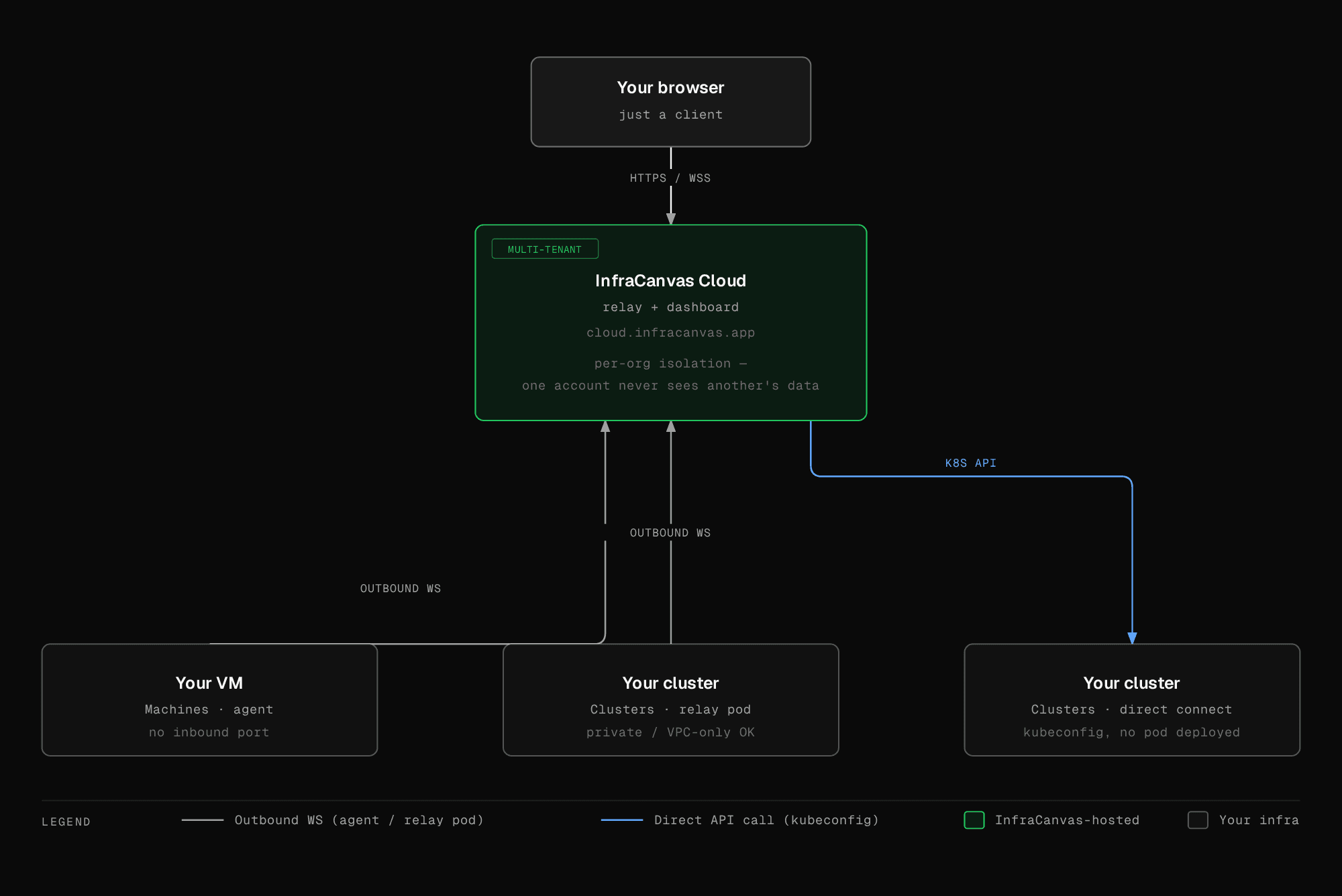
Machines read only infrastructure metadata, using the same interfaces you already have: the Docker or Podman socket and your kubeconfig. Secret values never leave the machine. Cluster kubeconfigs are encrypted at rest and only ever decrypted in memory. See Security & data handling for the full data flow.
What you can do
See everything, live
- Zero-config discovery. Point the agent at a box and get a full topology: hosts, containers, images, networks, volumes, and the entire Kubernetes object graph (nodes, namespaces, workloads, pods, services, ingresses).
- A live canvas, not a snapshot. The graph updates as containers start and pods reschedule, with health rolled up at every level as nodes come and go.
- Multiple machines, one view. Map a whole fleet and navigate between machines, clusters, and namespaces from the same canvas.
- Kubernetes clusters, no agent. Connect a cluster directly via kubeconfig, or with a relay pod for private clusters. See Clusters.
Operate from the canvas
- Web terminals. Open an interactive shell on a host or inside a container, no SSH keys and no inbound ports required. Sessions stream over the same WebSocket.
- One-click actions. Restart a container, scale a deployment, restart a rollout, restart a systemd service, delete a pod, and more, each scoped to its resource type.
- Edit manifests inline. View any Kubernetes object's live YAML, edit it, and apply. A reset to the live version is one click away.
- Stream logs. Tail container, pod, host, and service logs live, then
export them as
.logor.txt.
See Actions & terminals for the full list.
Understand trends
- Metrics & history. CPU (overall and per-core), memory, disk usage and throughput, load average, and network, collected continuously and charted as trends per machine and across your fleet. See Metrics & history.
Automate & integrate
- Alerts. A live event feed flags CrashLoopBackOff, OOMKills, and probe failures with one-click remediation. Threshold-based alert rules with webhook/Slack/PagerDuty delivery are coming soon.
- Batch operations. Run the same action across many resources at once.
Coming soon: the MCP server (query and operate your infrastructure from Claude) and a built-in AI assistant are visible in the dashboard sidebar but not yet enabled. They'll ship at the same per-VM / per-cluster price, no separate charge.
Govern access
- RBAC & approval gates. Control who can view and who can act, with optional approval gates on sensitive operations.
- Audit log. Every action is recorded with the acting user's email, the target resource, and a timestamp.
- Multi-account. One machine can stream to several organizations at once without disconnecting any of them. See Connect a VM to multiple accounts.
Get started
Quickstart
Connect your first machine or cluster in under a minute.
Clusters
Kubernetes with zero agent install: kubeconfig or relay pod.
Install the agent
Scopes, the systemd service, and what the agent reads.
Actions & terminals
Operate your infrastructure from the canvas.
Plans & limits
Compare tiers, limits, and features.
Security
What we see, and what we never store.